

Automating persona research with Clay
Go from static information to live customer intel

Most GTM teams know their buyers on paper. They have an org chart mapped out, job titles documented, and basic pain points listed in a shared deck. But there's a gap between knowing who your customers are and going deep on understanding them. It's one thing to say your ideal persona is a "Director of Marketing at mid-market SaaS companies"—it's another to know this person juggles six attribution tools, struggles with GTM alignment, and measures success by qualified pipeline, not MQLs.
This gap can show up in multiple places — like marketing messaging that sounds generic, and sales conversations that never quite land. Most teams care about deeply understanding their customer personas, but the process of getting there has a few challenges:
Persona research often lacks context: Most teams have some basic data in their CRM—account records, contact roles, industries—that helps sketch out their core buyer personas. That’s the easy part. The harder (and more important) part is understanding what these personas actually care about and the context around their companies: their core product use cases, what tools they rely on, what stage they’re in, and their top pain points.
That’s where things usually break down. The data is scattered across different places: disparate pieces of information across Gong calls, objections buried in G2 reviews, the way someone frames their job on LinkedIn. You end up piecing together a few anecdotes or narrow data points, which rarely reflect your customer base as a whole—especially if you’re selling into hundreds of accounts.
It’s usually a static, manual process: Titles change, responsibilities shift, and sometimes your product strategy evolves too. Persona research you spent days pulling together can quickly become stale, and all that work ends up sitting in a deck instead of continually shaping how your team goes to market.
At Clay, we use our product internally to solve our own GTM challenges—our internal GTM engineering team sets the gold standard and enables us to build workflows for our own internal use cases. So when our sales team needed more data and documentation on our buyer personas, it was the perfect opportunity to use Clay to build them something useful. The process took us from a comprehensive Clay table to a Notion database that captures pain points, objections, talk tracks, and use cases for each core buyer. This gets automatically connected to Dust.tt so the team can ask specific questions about personas and get contextual answers on the go.
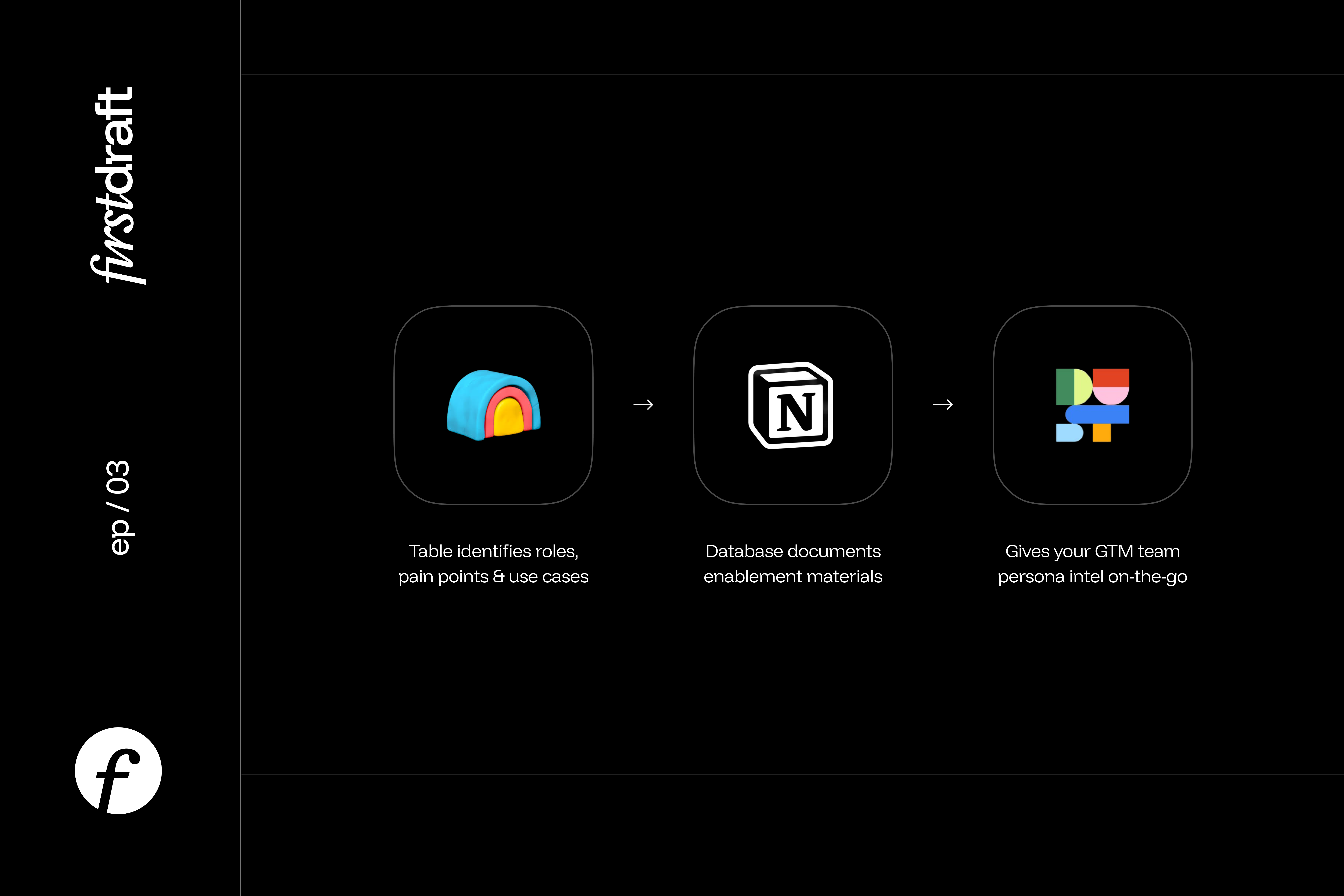
Here's what I learned through this process—both what's already working for us and enhancements I’d like to add.
Company context comes first
Before you can understand what motivates a persona, you need to understand the environment they're operating in. A VP of Sales at a 50-person startup can have completely different pain points than the same title at a post-Series C company with 500 employees. The context shapes everything—their priorities, their budget, their decision-making process, even their daily workflow.
Clay makes it easy to enrich company data in your CRM and identify signals that matter for persona research:
Growth stage: Is the company post-Series C with a mature org, or an earlier-stage team experimenting with tooling? Funding rounds, headcount growth, and recent job postings are all strong indicators.
I’d recommend narrowing down on the highest priority segment for your business before starting your persona research. We prioritized enterprise companies in the near term, and that helped focus the effort.
Tech stack composition: Not just "they use Salesforce," but whether they run Salesforce + Outreach, or HubSpot + Apollo. These combinations show how your product will fit into workflows, and which integrations to emphasize.
Product usage at the account level: Connecting Clay with your data warehouse lets you understand feature usage by persona. For example: enterprise accounts relying heavily on integrations vs. mid-market accounts clustering around a single core workflow.
Trigger events: Funding announcements, leadership changes, or recent acquisitions—signals that often correlate with readiness to buy or expand.
Market presence: You can pull in external signals like hiring velocity or job postings tied to specific functions, to understand how headcount can influence product usage.
Once these layers are combined, picture of your ICP becomes much sharper. Instead of saying "our ICP is mid-market SaaS," you can say: "Our ICP is late-stage SaaS companies on Salesforce + Outreach, growing headcount by 20%+ YoY, recently expanded their outbound team, and adopting integrations within the first 90 days."
Beyond titles: finding real pain points and motivations
Once you've mapped accounts, the next step is understanding the people inside those companies—the decision makers, power users, and executive sponsors who actually drive deals forward.
Titles are one of the biggest sources of noise in persona work. Take finance teams as an example—what one company calls a Financial Planning Manager another might label as Senior FP&A Analyst. Different labels, sometimes overlapping responsibilities.
Clay's AI agent, Claygent, can bring structure to this chaos by automatically grouping titles into broader persona buckets. For example:
Strategic group → CFO, VP Finance, Finance Director
Operations group → Finance Operations Manager, Accounting Operations Specialist
Analysis group → FP&A Analyst, Financial Planning Manager, Business Analyst
This organization helps collapse dozens of noisy titles into three or four clean persona groups, making it much easier to spot patterns across your account base.
Once the titles are organized, you can layer on deeper analysis:
LinkedIn bios and headlines: Use Claygent to summarize each person's core responsibilities based on how they describe themselves. A Finance Operations Manager with a bio like "Streamlining month-end close processes and implementing automated reporting for SaaS metrics" gets tagged with responsibilities around process optimization and reporting automation.
Social media posts, blogs, news articles and other public content: Scan public content for recurring themes—pain points they mention (manual reporting, data inconsistencies), wins they celebrate (faster close cycles, automated dashboards), or tools they reference.
Call transcripts from Gong: Pull insights from actual sales and customer conversations to understand how they frame their challenges and priorities.
Product use-cases: If your team tracks product use-cases in your CRM, you can bring this into Clay to understand the core product use-case for your persona. You can also enhance this with real product usage data from your data warehouse, to understand if specific persona groups use some features more than others.
With all this data in your Clay table, you can use Claygent to condense it into three key areas: core responsibilities, frequent pain points, and potential use cases.
For example:
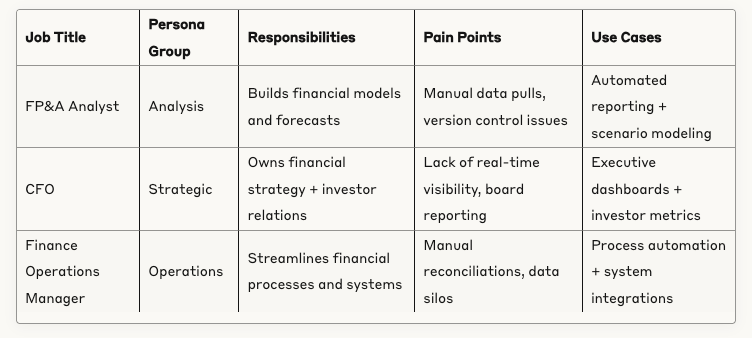
By combining grouped persona buckets with responsibilities and pain points from public data, you end up with personas that go beyond generic statements like "CFOs care about accuracy." Instead, they're grounded in how people in finance roles actually describe their work, challenges, and goals—making the insights far more useful for messaging and sales conversations. Plus, you can always validate this data with real 1:1 conversations with customers.
Turning insights into enablement
Once the personas are grouped and enriched in Clay, the next thing to do is put them into digestible enablement materials that sales reps can use. You can use the insights from your Clay table to build persona and ICP guides in Notion, Google Docs, or even use Clay’s Google Slides integration to create custom decks. Here’s an overview of how you can structure documents for each persona:
Title mapping → Show reps that "Financial Planning Manager" and "Senior FP&A Analyst" are essentially the same buyer, so they don't get confused by different titles across accounts.
Day-to-day responsibilities → Skip generic descriptions like "responsible for financial planning." Instead: "builds quarterly forecasts, manages the annual budget process, creates board-ready financial reports, and tracks variance against plan."
Pain points in their words → Pull directly from bios and social posts so you're using their language, not yours. Example: "Spending 80% of my time in Excel pulling data instead of analyzing it" instead of "struggles with manual reporting processes."
Relevant use cases → Map to your product's capabilities, but frame them around their actual workflow. For an FP&A Analyst: "automated data consolidation to shift from data collection to strategic analysis."
Customer examples → Reference real customers from your Clay table who match this persona, so reps can mention relevant case studies during conversations.
Competitive landscape and tooling → Document what tools they currently use and what alternatives they're evaluating, so reps know the competitive context going into calls.
Social proof → Include a customer quote or brief story from a similar account for give reps concrete examples for customer conversations
You can also create buyer profiles using real customer examples, to build credibility and help your sales team truly understand your customer base. Here’s an example:
Sample customer: Sarah Chen, Senior FP&A Analyst at GrowthTech (Series B SaaS)
Responsibilities: Builds monthly and quarterly forecasts, manages department budgets, creates variance reports for leadership, supports board meeting preparation.
Pain points: "I spend 80% of my time in Excel pulling data from different systems instead of analyzing trends and building scenarios."
Use cases: Automated data consolidation, real-time variance tracking, scenario modeling tools, executive dashboard creation.
Proof point: "We went from 5 days to 2 hours for monthly close reporting once we automated our data pulls." — Sarah at GrowthTech
The difference between good and great enablement is specificity. Your reps should be able to scan a persona profile and immediately know how to adjust their pitch for that specific buyer.
Need an easy starting point for this documentation? Check out the Notion template I put together below.
From static exercise to living system
What Clay makes possible is turning persona research into a system that grows with your business:
Account intelligence that goes deeper → Understand how companies actually operate—their growth stage, their tech stack combinations, the signals that tell you more about their growth
People insights grounded in reality → Cut through confusing job titles to group people by what they actually do, using their own words to describe their challenges and priorities.
Enablement that gets used → Create buyer profiles with enough specificity that your sales team can reference them during live calls, complete with real customer examples and competitive context.
Instead of spending weeks building personas that go stale, you get a research process that refreshes itself. Your understanding of customers evolves as they do, and your go-to-market strategy stays sharp instead of slowly drifting out of alignment.
If you try this approach, I'd love to hear your feedback. What worked? What’s missing? Email me at karishma.rajaratnam@gmail.com or find me on LinkedIn.